
- Joined
- Sep 17, 2020
- Messages
- 2
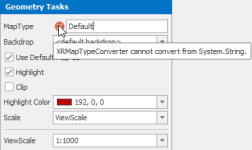
I'm running into issues trying to add a map into a report with the Report Designer with GSA v5.2.5. It doesn't want to grab the correct map type or actual geometry and comes up with an error "XRMapTypeConverter cannot convert from System.String". In the screen shot below I've added the map name "Default" since it won't populate anything. Tried a few scenarios but still end up with the error.
Anything I'm doing wrong here? I'm simply dragging fields into the Report Designer including geometry fields and the geometry fields are the only ones that don't appear to work.
Thanks,
Rob
Anything I'm doing wrong here? I'm simply dragging fields into the Report Designer including geometry fields and the geometry fields are the only ones that don't appear to work.
Thanks,
Rob